
AI color analysis, checked before you trust it
Upload one or two intentional photos. The analysis compares undertone, depth, chroma, and contrast across your face, then a person checks your likely 12-season result before it is delivered.
- No color picker
- One or two photos
- Human-reviewed result
- No card required
- Source photos deleted after analysis
Built in Canada. Human-reviewed. Available worldwide.
A more careful read
Why this is different from a color picker.
One sampled pixel is not your coloring
A picker can return a different season depending on which patch of skin, hair, or eye you select. This process considers visible face, neck, hair, and eye regions across one or two intentional photos. You do not choose the pixels yourself.
Compare AI color analysis tools →A second opinion before the final call
Surface redness can be mistaken for undertone, and contrast can point toward a neighboring season. For the paid report, a second, separate AI system reads your photos independently, like getting another opinion. I compare both readings, check disagreements, and make the final call. You can also send new daylight photos with a suggested shirt, scarf, or piece of fabric held below your face when a closer comparison would help.
Why AI results can conflict →Start free
Add two clear photos.
One with your hair pulled back, one as you usually look. Add an email so you can recover the result.
Reopen a saved result
Enter the email you used for your photos. A one-time code can restore your latest result on this device.
Optional, recommended
The full photo guide.
The basics above are enough to get a read. If you want the most accurate one the camera can give,
especially if a casual selfie keeps reading you warmer than you think you are, set the photos up like this.
Most of it comes down to one thing: clean, neutral light.
Read the guide Hide the guide
Optional, recommended
The full photo guide.
The basics above are enough to get a read. If you want the most accurate one the camera can give, especially if a casual selfie keeps reading you warmer than you think you are, set the photos up like this. Most of it comes down to one thing: clean, neutral light.
Light source
Most importantUse indirect, north-facing daylight. Stand a few feet back from a window that does not have direct sun coming through it. Direct sun is too warm and harsh, so you want the soft, neutral light of open shade or an overcast sky. Mid-morning to early afternoon is best, roughly 10am to 2pm, when daylight is closest to neutral. Avoid early morning and golden hour entirely, since both throw warm light that re-triggers the exact bias we are trying to remove. Turn off all indoor lights: household bulbs are warm, or worse, a mix of color temperatures, and mixing them with daylight wrecks the reading. One clean light source only.
Face the light
Point your face toward the window so the light falls evenly on you, not from the side or above. No shadows across one cheek. Even, flat, frontal light is unflattering for portraits but ideal for color diagnosis, because it does not distort undertone.
Background and clothing
Wear a plain white or light-grey top, or drape a white towel over your shoulders. This does two jobs: it gives the analysis a neutral reference to judge your skin against, and it keeps colored clothing from reflecting onto your skin. The background should be a neutral white or grey wall, not a warm beige one, since beige reflects warmth back onto your face and pushes the read warm.
The white-paper reference
Key upgradeHold a plain white sheet of printer paper next to your face in at least one shot. This sets a known anchor: white paper should look white, so if it looks cream or yellow in your photo, the lighting is warm and any warmth in your skin can be discounted. This single addition does more to fix a warm bias than anything else, because it makes it possible to correct for the light instead of mistaking it for your undertone.
Camera settings
If your phone lets you lock white balance or shoot in a neutral or daylight preset, do it. Turn off any "beauty," "auto-enhance," "warm tone," or portrait-mode skin smoothing. These often add warmth and shift color. Do not apply any filter. Shoot the raw photo.
What to capture
Take this small set, then upload the clearest one or two photos requested above:
- 1. Face forward, with hair away from your face if applicable, and white paper held beside your cheek.
- 2. The same clear face view without the paper.
- 3. Inner wrist held up near your face, to show vein tone and the thinnest, least sun-exposed skin.
- 4. An everyday shot in the same neutral light, for extra styling context.
No manual pixel picking
You do not choose one skin, hair, or eye pixel and ask it to represent your coloring. The workflow reads visible regions across the photo.
One or two clear photos
A clear face photo shows your skin, eyes, and contrast. A second everyday photo adds hair and styling context before the workflow chooses a likely season.
Photo distractions are reduced
The analysis focuses on visible skin, hair, eyes, and neck. Clothing, accessories, and background color are left out where possible.
A person checks the result
Every free season read is reviewed before delivery. Conflicting signals get another look instead of an unexplained confidence score.
Is the AI color analysis accurate? +
Treat it as a reference, not a diagnosis. AI reads color from a photo, and phone cameras, lighting, and filters all shift color. The result is a useful starting point, but a trained analyst comparing many colors against your face in person is more reliable.
Is every free AI color analysis reviewed by a person? +
Yes. A person checks each free season read before delivery. For the full report, a second, separate AI system reads your photos like another opinion. I compare both readings, check disagreements, and make the final call.
What happens to my photos? +
Your photos are securely stored and used to create your private color analysis. Source photos are deleted from this site’s storage after the analysis. ColorPaletteAnalysis.com does not use submitted photos to train AI models.
Who processes my photos? +
OpenAI or Anthropic may process submitted photos for the core color analysis. Cloudflare infrastructure stores uploads. Replicate, a Cloudflare company, may process generated report images. Their commercial data terms apply alongside this site’s privacy policy.
How will I get my result? +
After your photos upload successfully, your free season read is saved in this browser. If you need another device, verify the email you used with a one-time code to reopen your latest saved read.
Can I redo my AI color analysis? +
Yes. The free season read includes redos from the same browser, so you can submit new photos or add new information if your first setup was not ideal.
Does the full report include clothing and grooming guidance? +
Yes. The full report covers your best colors, jewelry metals, hair direction, clothing, and makeup or grooming guidance. It uses your submitted photos and any optional drape photos you send.
Can I send new drape photos for the full report? +
Yes. After purchase, I can suggest a plain shirt, scarf, or piece of fabric to hold just below your face in new daylight photos. I will tell you which colors to use and how to send the photos. These optional drape photos give me a clearer comparison when your two closest seasons are difficult to separate.
Why upload two photos? +
The first photo shows your skin, eyes, and contrast clearly. An everyday photo adds hair and styling context. If you do not have both, choose the one-photo option.
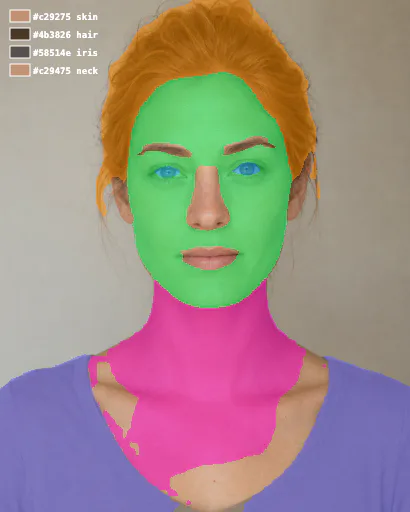
Illustrative analysis preview
Inside the full report
Your photos are read in parts, not as one flat image.
The report uses visible skin, hair, eyes, and neck areas to build the read. Clothing, accessories, and background colour are left out where possible.
01. Skin + neck
Helps assess undertone and depth in areas that are usually less affected by makeup.
02. Hair + eyes
Helps assess the contrast and clarity that shape a likely season.
03. Distractions excluded
A bright top, hat, or coloured wall should not decide your result.
A second opinion, not just a longer report.
A second, separate AI system reads your photos independently. I compare both readings, check any disagreement, and make the final call. If two seasons stay close, I will suggest a shirt, scarf, or piece of fabric to hold below your face in new daylight photos. I will tell you which colors to use and how to send the photos. The finished report connects that result to clothing colors, metals, hair color, makeup or grooming, and styling.
Want the real thing? An analyst confirms it.
A trained color analyst compares many colors against your face to find your personal season. Browse verified analysts by city, method, and price.

